




Introduction
In today’s visually driven social media landscape, the art of storytelling has transcended traditional formats to embrace more dynamic and interactive forms. Instagram Stories have become a cornerstone for brands and individuals aiming to captivate their audience’s fleeting attention. Among the myriad of tools available for crafting these stories, Adobe Spark stands out for its user-friendly interface and powerful features. This guide will delve into the intricacies of creating visually stunning Instagram Stories using Adobe Spark, ensuring your content not only stands out but also resonates with your audience.
Understanding the Power of Instagram Stories
The Importance of Visual Appeal in Social Media
In the realm of social media, first impressions are paramount. The visual appeal of your content often determines whether a viewer will engage further or scroll past. Instagram Stories, with their full-screen format, offer a unique opportunity to create immersive visual experiences. High-quality, aesthetically pleasing visuals can significantly enhance your brand’s perception and encourage audience engagement.
How Instagram Stories Drive Engagement
Instagram Stories are more than just fleeting images; they are a potent engagement tool. The ephemeral nature of Stories creates a sense of urgency, prompting viewers to act quickly. Features like polls, questions, and swipe-ups transform passive viewers into active participants, fostering deeper interaction and connection with your audience. By leveraging these interactive elements, you can drive higher engagement rates and cultivate a loyal following.
Why Use Adobe Spark for Instagram Stories
Overview of Adobe Spark’s Features
Adobe Spark is a versatile tool designed to simplify the creation of stunning visual content. Its robust features include a wide array of templates, intuitive design tools, and seamless integration with other Adobe products. Whether you’re a novice or a seasoned designer, Adobe Spark provides everything you need to produce professional-quality stories effortlessly.
Benefits of Using Adobe Spark for Social Media Content
The primary advantage of using Adobe Spark lies in its accessibility and efficiency. It enables users to quickly generate polished, on-brand content without the steep learning curve associated with more complex design software. Additionally, Adobe Spark’s cloud-based platform allows for easy collaboration and editing across devices, ensuring your team can work cohesively from anywhere.
Comparison with Other Story Creation Tools
While numerous tools are available for creating Instagram Stories, Adobe Spark distinguishes itself through its comprehensive feature set and user-friendly interface. Compared to alternatives like Canva or Over, Adobe Spark offers superior integration with Adobe’s suite of creative tools, providing enhanced flexibility and control over your designs. Its unique combination of simplicity and power makes it an ideal choice for both individual creators and professional teams.
Getting Started with Adobe Spark
1. Open Play Store and Search for Adobe Express:
Install the app by searching for “Adobe Express: A Video Design.”

2. Login:
Sign in with your preferred method (e.g., Google, Facebook, Adobe ID).

3. Click on Continue:
Proceed to the main interface by clicking “Continue.”

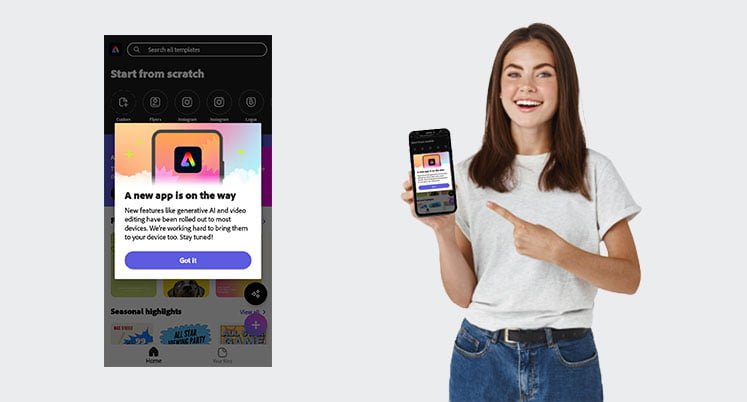
4. Click on Got It:
Acknowledge the introductory message by clicking “Got it.”
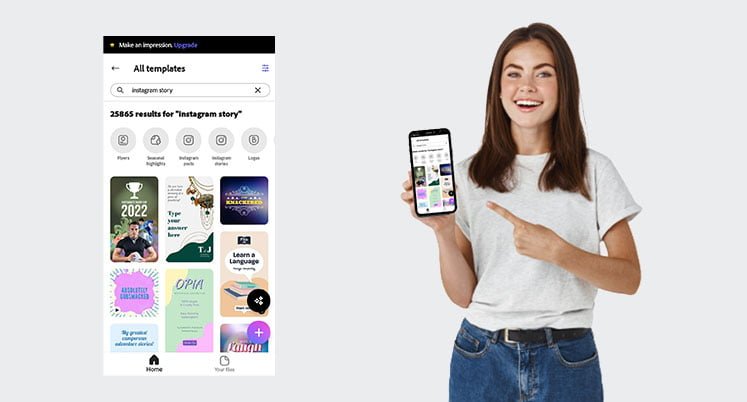
5. Search for Instagram Story Templates:
Use the search bar to find Instagram Story templates.

6. Filter for Free Templates:
Click on the filter icon in the top right corner and select “Free.”

7. Choose a Template:
Browse the options and select a template you like.
8. Remix the Template:
Click on “Remix this template” to start editing.

9. Customize Your Template:
Add or edit images, headings, and other elements to fit your needs.

10. Download Your Finished Story:
Once you’re satisfied with your design, click the download button in the top right corner.

11. Share Your Story:
Your Instagram Story is now ready to be posted.

Conclusion
Recap of Key Points
Creating eye-catching Instagram Stories with Adobe Spark involves a blend of creativity, strategic planning, and technical know-how. From understanding the platform’s features to mastering design principles and leveraging interactive elements, each step plays a vital role in crafting compelling stories.
Encouragement to Experiment and Create
Don’t be afraid to experiment with different styles, techniques, and features. Creativity thrives on exploration, and Adobe Spark provides a robust platform to test and refine your ideas. Embrace the process and enjoy the journey of storytelling.
Final Tips for Creating Eye-Catching Instagram Stories
Stay consistent with your brand identity, keep your audience engaged with interactive elements, and continually analyze your performance to make data-driven improvements. With these tips in mind, you’re well on your way to creating Instagram Stories that not only capture attention but also foster meaningful connections with your audience.